

Bar graphs VU meters can be easily made with a simple integrated circuit. There are several of them with different characteristics, but they all present the same basic functionality: one or more LED in a row are used to visualize, more or less precisely, the voltage amplitude presented to the input. That voltage can be either a direct current or an alternate current and, in particular, it could be the output of an audio amplifier.
But, what is inside these integrated circuits? How do they make possible this kind of behavior?
Here is the design of a simple gadget that shows how a bar graph VU meter works. Building and using this device is certainly a fun way to learn the principles used to design the bar graph integrated circuits.

The basic element of the circuit is the one made with the components Q1, R1, R10, D1, and D10.
This block of components then replicates several times to increase the number of LEDs used in the bar graph. In this particular case, the same circuit is replicated 8 more times, for a total of 9 LEDs in the bar.
You can also see that each block, or stage, receives as the input the output from the previous stage.
Diodes form D10 to D17 are used to provide a different threshold to each stage. In fact, let’s say that the first stage is triggered when the voltage on the anode of D10 reaches about 3V. In order to trigger the second stage we will need 3V on that stage, but that means that the voltage at the first stage has to go up to 3+0.6V, or 3.6V. The extra 0.6V is the forward voltage of diode D10.
Similarly, to reach each further stage, we will need an input voltage 0.6V higher for each stage we want to light up.
In the end, to light up the last stage we will need an input voltage of at least 3 + 8 times 0.6V, or 7.8 volts.
Once the threshold is reached in a stage, the corresponding transistor switches on and starts conducting a current that is only limited by the LED and the series resistor which, in this case, is 330 ohms. With the values in the circuit, the LED current will be about 20 mA.
So, when we apply a voltage to the input terminals, depending how high the voltage is we will see a number of consecutive LEDs lighting up, while the remaining will stay off because their respective stages have not been triggered yet or, in other words, the voltage at those stages hasn’t yet reached the threshold imposed by the diodes.
Note also that resistors R10 to R18 are not all of the same value. This is because by the time the voltage reaches the threshold in the last stage with transistor Q9, the voltage on the previous transistors is higher and higher while we move to the left of the circuit, since we need to add back the 0.6V that the diodes are dropping. Therefore, to avoid damage to the transistors on the left, we need to increase the base resistor when moving from the right to the left of the circuit.
Another thing to notice is the trimpot located at the connectors for the input signal. The circuit as it is, is capable of handling signals up to the value of the power supply, which is 9V.
However, we can adjust the trimpot to handle higher signals, just by moving the trimpot cursor toward the end that is connected to ground, in order to get only a fraction of the actual input signal.
Conversely, if you had a very small input signal, that could not trigger even the first stage of this circuit. In that case, you could still add a very simple amplifier between the source of the signal and the input of this circuit, which would help increase the level of the signal to the required value.
Finally, you see that the bar graph meter is powered with a 9V power supply. I used such value so you can use a 9V battery, if you like to try the circuit.
However, if you wanted to use this circuit as part of a more complex system having a higher value of the power supply, you could just modify resistors from R1 to R9 and use the power supply of that system.
For example, if you planned to use 12V instead of 9, you would use resistors of 470 ohm rather than 330, and everything would work just fine.
Remember, however, that 9V is the minimum voltage you can use to correctly power the bar graph circuit. You can only increase the power supply voltage to a higher value and increase accordingly the resistors R1 to R9. That is because we need a power supply that exceeds the voltage at the base of the leftmost transistor Q1, which can be as high as 7.8 volts, as we said before.
The circuit can be easily assembled on a per-board, like in the case in the frnt picture of this post. There, I used a 3 prongs connector to provide the power supply and the input for the external signal.
Once the circuit is assembled, set the trimpot with the cursor toward the ground side, then power up the device and put a signal to its input. The signal should be the highest possible with the amplifier to which you are attaching the VU meter. Then, adjust the trimpot until all the LEDs are lighted up. Now the circuit is tuned and you can input to it any signal that changes between 0V and the max you used for the tuning.
For further information, and to see the VU meter in action, take a look at this video that I posted on my YouTube channel.
Happy experiments!!!


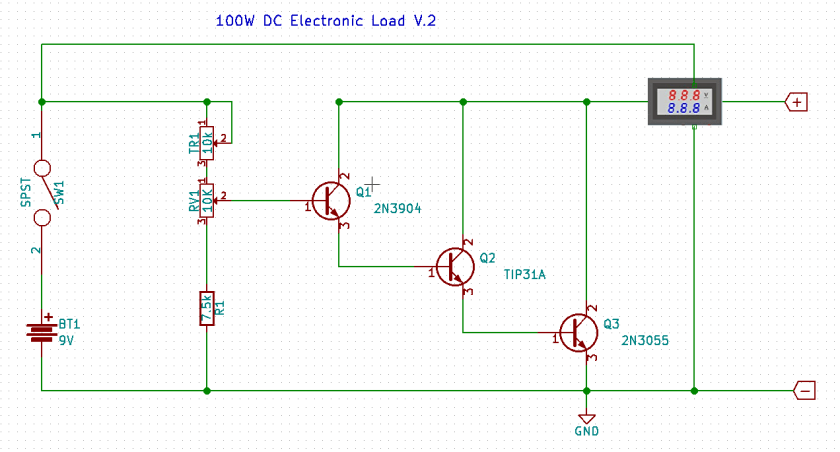
 A classic method for doing so is to use a rheostat, which is essentially a potentiometer capable of dissipating the amount of power produced by the power supply. The resistance of the rheostat can be changed and therefore different amount of currents can be used to test the power supply. However, rheostats are big, heavy and cumbersome.

 eleneasy.com